Someone searches "Seedance 3.0" because a clip they liked looked finished. The bottle stayed a bottle. The camera moved once, on purpose. The sound, when there was sound, arrived with the picture. They want that result on their own product, their own room, or a scene that exists only as a sentence. The search then splits. One person has a paragraph and wants a clip. Another has a photograph they already trust and wants that photograph to move. A third has heard that a new Seedance model will make ten-minute films, and they want to know whether they can buy that today.
Those are three different jobs, and the pages that rank for them often answer a fourth question the searcher did not ask. This guide sorts the jobs, then walks through how to make each of the two you can actually run: a clip from a written shot, and a clip from a still you supply. The worked example is Seedance 3, an independent browser studio, read on November 6, 2026. Its own pages say it generates with Seedance 1.5 Pro, Veo 3.1 and Sora 2 while Seedance 3.0 is on the way, and the model picker also lists Seedance 2.0, Kling 3.0, Wan 2.7, Hailuo 2.3 Pro and Grok Imagine Video. The site states that it is an independent service and is not affiliated with ByteDance or the other model providers it integrates. This article is published on happyhorse2.video. Credits bought in one studio do not spend in the other.

What each search is actually asking for
Five phrases show up around this subject. They share a family name and they point at different objects. Treating them as one product is how people pay for a fifteen-second social cut when they thought they were ordering a short film.
Seedance 3.0 is the version name. In public writing it refers to the next Seedance model from ByteDance's Seed team. ByteDance has published launch posts for earlier versions. It has not, on those same channels, published a launch post for a model called Seedance 3.0. Anything specific you read about clip length, resolution or price for 3.0 is a leak, a forecast, or a page using the name for a studio. The section below keeps those categories apart.
Seedance 3 AI Video Generator is the tool-shaped phrase. The person wants software: a prompt box, an upload button, a price, and a file they can download. They are usually willing to use whichever current engine the tool routes to, as long as the interface is one place and the quote is visible before they spend. That is a product request, and it maps onto a website, which is a different thing from a model release.
Seedance 3.0 AI Video is the output-shaped phrase. The person wants the clip, and they have attached the version number because that is the name circulating in the posts they saw. The useful question under this phrase is which engine, length and frame size the file will actually be. A title that says 3.0 and a render that runs on Seedance 1.5 Pro can both be true at once. The title describes the studio's brand. The render describes the model selected for that job.
Seedance 3 Image to Video is a workflow. A still goes in. Motion comes out. The still is evidence: the product, the face, the room, the light. The model's job is what happens next. This is the right phrase when the picture already exists and the risk you care about is drift, meaning the bottle, the label or the person quietly becoming someone else by the last second.
Seedance 3 Text to Video is the other workflow. The subject does not exist yet, or you would rather the model invent it. A sentence carries the subject, the action, the camera and the light. Nothing in the frame is anchored to a file you approve. That freedom is the feature, and it is also why a text-to-video pass is the wrong tool for a packshot whose label has to match the one legal already signed.
Two of these phrases name a version and a brand. Two name an input. One names a piece of software. Decide which of those you meant before you open a checkout.
What ByteDance has published, and what is still a rumor
The Seedance line is a ByteDance Seed video family. The public record, as of this article, has two launch posts that matter and a rumor cycle around a third number.
On February 12, 2026, ByteDance Seed published the Seedance 2.0 launch post. The post describes a unified multimodal audio-video architecture with four inputs: text, image, audio and video. It says a user can combine up to 9 images, 3 video clips and 3 audio clips with a written instruction, and that the model can reference composition, motion, camera, effects and sound from those assets. It describes 15-second multi-shot audio-video output with dual-channel audio, covering music, effects and voice, aligned to the picture. It also describes video extension and prompt-driven editing. The same post is explicit about remaining weaknesses: detail stability, hyper-realism, occasional audio distortion, multi-subject consistency, on-screen text, and complex edits. Those caveats belong in any honest account of the model. A launch post that lists them is more useful than a landing page that does not.
On July 31, 2026, ByteDance Seed published the Seedance 2.5 launch post. The post says Seedance 2.5 generates up to 30 seconds of audio and video in one pass, can be extended across further rounds, and accepts up to 30 images, 10 video clips and 10 audio clips as references. It describes timestamp-level editing, stronger shot transitions, and production-oriented controls such as green screen. It says the model was rolling out on Jimeng and Doubao, with API access described as coming soon at the time of that post. Cloudflare's Workers AI page for Seedance 2.5 documents a callable route with text plus up to 30 images, 10 videos and 10 audio clips, first-and-last-frame inputs, and 480p or 720p output. That documents where 2.5 can run. A 3.0 release would be its own announcement.
The 3.0 conversation is older than 2.5 and thinner. On February 17, 2026, NDTV Profit reported that Seedance 3.0 was rumored to be in late development, citing leaks on Chinese platforms, including posts attributed to Dr Liu Zheng. The reported claims included single takes past ten minutes, internal tests around eighteen minutes, a "narrative memory" that would hold plot and character across a long piece, joint picture-and-sound generation, lip sync in English, Chinese, Japanese and Korean, director-style camera language, and a large drop in the cost of a minute of footage. Those sentences are reports of leaks. ByteDance Seed's own blog, in the posts above, does not confirm them. Seedance Now's model page, last checked October 23, 2026, still described Seedance 3.0 as unreleased, with no official model page and no announced date. On November 6, 2026, the studio this guide uses still tells visitors that Seedance 3.0 is on the way.
So a practical reader has a clean split. Seedance 1.5 Pro, Seedance 2.0 and Seedance 2.5 are models with public descriptions. Seedance 3.0 is a name with a rumor attached. A website can use the name as a brand while it waits. The brand can be useful. The rumor should stay labeled as a rumor, because a ten-minute single take and a fifteen-second social clip are different purchases.
What the Seedance 3 studio is for
Seedance 3 presents itself as a Seedance 3.0 AI video studio and a release hub. The first screen offers two doors. Creative mode turns a prompt or a still into a shot, switches among Seedance, Veo and Sora, and covers widescreen or vertical clips in a range the page summarizes as 4 to 15 seconds. E-commerce mode starts from a product photo, takes a one-line description of what the product does, and writes a time-coded shot list aimed at TikTok, Reels, Amazon or Shopify.
The gallery under that pitch is the kind of work the studio says businesses order: headphone launches, perfume portraits, a stadium sponsorship spot, a running-shoe ad, a skincare hero, a handmade product demo, a coat lookbook, a seasonal coffee launch, a brand mascot, a serum packshot, a family brand film, a lifestyle commercial, a launch teaser. Some cards are marked as start frames, meaning a still you can animate. Others name the engine used for the sample, Seedance 1.5 Pro or Veo 3.1. Samples are single runs. Two renders from the same still and the same sentence rarely match, so a gallery is evidence of a technique, and a promise that your file will look like the sample would be a different claim. The studio does not make that promise in the lines quoted here, and this guide will not add it.
Under the marketing sections, the page is more specific about who it thinks will stay. Creators who need a clip without booking a crew. Marketing teams testing several hooks from one approved key visual. Sellers turning a listing photo into a product film. Agencies who want a finished cut in a pitch. Those four jobs share a constraint: the subject is already decided, and the missing piece is motion, format and a file. That is why image to video and a fixed first frame sit in the feature list next to plain-language text to video.
The studio also says it can make the opening still inside the same product, then animate it. Plan copy lists image engines for that step, including Nano Banana, Seedream, GPT Image 2.0, Grok Imagine, Wan 2.7 and Qwen Image. A start frame made in the product and a start frame you photographed yourself enter the video step the same way: as the picture the motion has to honor.
How to make a Seedance 3 text to video clip
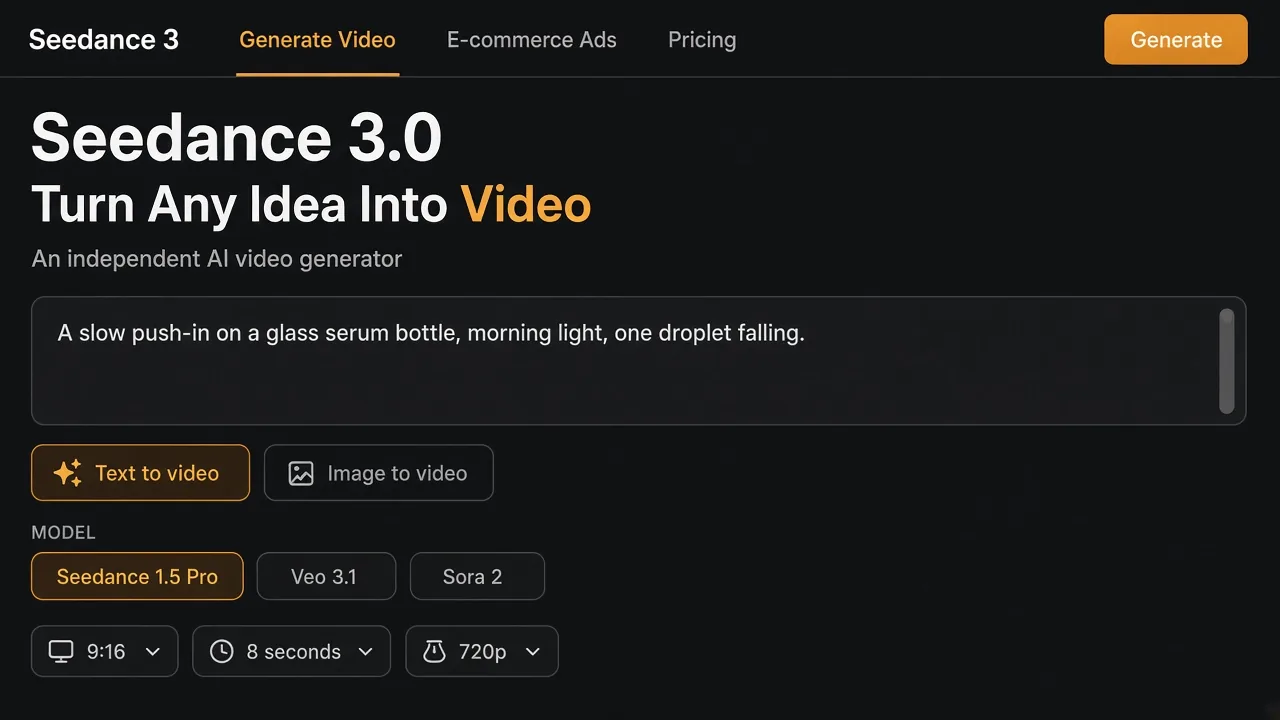
Seedance 3 text to video starts from language. The feature line on the studio is plain: a written shot description becomes a clip, without a timeline, keyframes or an editing program. The console illustrated above is the shape of that job. A prompt. A mode set to text to video. One model selected. A frame, a length and a resolution that the chosen model actually offers. Then a generate action, after the credit figure for that combination is on screen.
A useful prompt is a shot, and a shot has a small number of slots. Fill them in order.
- The subject, with the details that would embarrass you if the model invented them. "An amber glass dropper bottle" is a subject. "A luxury skincare product" is a category, and categories come back as whatever the model finds average.
- One action, with a verb and a limit. "A single droplet falls past the bottle and lands on linen" can be checked. "Make it dynamic and premium" cannot.
- The camera, as one move. A slow push-in, a locked-off frame, a short orbit. Two moves in eight seconds read as a cut even when you did not ask for one.
- The light and the surface. Morning window light on limestone is a different picture from a dark sweep across black glass. Name the one you want.
- The sound, only when the model card says the engine produces it. Seedance 2.0's card on this studio says native audio. The pricing copy says Sora 2 clips include native audio. A model whose card is silent on audio should be briefed as a picture. You can lay sound in later.
- The length you selected, so the action fits. An eight-second model cannot perform a three-act spot. Describe the one beat that fits.
A prompt that satisfies those slots, for the bottle in the pictures on this page, looks like this:
Locked-off close shot of a small amber glass dropper bottle on warm limestone, morning window light, shallow focus. The bottle stays still. One clear droplet falls from above the cap, catches the light, and lands on the linen beside the base. Slow, quiet, no camera move, no extra products, no on-screen words.
That paragraph is a Seedance 3 text to video brief for a scene the model has to invent. It will invent a bottle that resembles the description. It will not invent your bottle, because you did not give it your bottle. If the label, the cap height or the exact glass color matters, stop here and switch modes. Text to video is the right mode when the scene is the point: a street, a room, a mascot, a concept frame, a background plate you will composite later.
Then match the settings to a real row in the model list, which is copied in the table further down. Seedance 1.5 Pro on this studio offers 4, 8 or 12 seconds, 480p, 720p or 1080p, and 16:9 or 9:16. An 8-second 720p vertical clip is inside that row. A 15-second clip is inside the Seedance 2.0, Kling 3.0, Wan 2.7 and Sora 2 rows, and outside the 1.5 Pro row. An 8-second engine draws eight seconds. The beats past that length never get drawn.
Generate once at the cheaper end of the row. Watch the whole clip on a phone, because that is where a 9:16 file will live. Look for the droplet (did it fall, or did it appear), the bottle (did a second bottle arrive), and the background (did a doorway open that the prompt never mentioned). Change one slot and render again. Changing the subject, the camera and the length in the same retry makes it impossible to know which change helped.
How to make a Seedance 3 image to video clip
Seedance 3 image to video starts from a file. The studio's feature line calls it image-to-video with a fixed first frame: the composition, the product details and any faces are the starting point, and the model supplies the motion. That is a smaller problem than text to video, which is why it is the better default for anything you already have a picture of.
The still has to be worth freezing as frame one. A few properties decide whether the later frames can stay loyal to it.
- The subject is large enough in the frame that a 480p encode still has edges to follow. A bottle that occupies a tenth of a wide shot becomes a smear when the camera is asked to move.
- The label, if it must be read, is in focus in the still. Motion will not invent sharp type that the photograph missed.
- The light is consistent across the object. A still with a hard flash on one side and a window on the other gives the model two explanations, and it will pick a third by second four.
- Hands, if they are in the still, are complete. Image-to-video is bad at growing a thumb that the crop cut off.
- The file is a real photograph or an approved render, and you have the right to animate the people in it. The studio's buying section says prompts, product photos and finished videos are processed to render and deliver the job. That statement covers processing and delivery. Animating a person or a campaign still requires your own right to use them.
The prompt for this mode should describe the change, and leave the still in charge of identity. Re-describing the bottle ("amber, frosted dropper, short shoulders, cream label") invites the model to reconcile your words with your pixels, and words often win. A motion brief is shorter:
The bottle and the limestone stay locked. A slow push-in, about ten percent closer by the end. One droplet falls past the left of the cap and lands on the stone. Window light holds. No new objects, no text, no cut.
That is the whole instruction. If you also want a last frame, use an engine whose card offers it. On this studio, Seedance 2.0 lists first-to-last frame control, Kling 3.0 lists start and end frames, Veo 3.1 Fast lists start-to-end frames, and Wan 2.7 lists first and last frames. Hailuo 2.3 Pro is described as expressive character motion from a single still, at 6 or 10 seconds. A last frame is how you pin the ending composition: the droplet has landed, the camera is closer, the bottle has not rotated. Without one, the model is free to drift for the entire duration, and it uses that freedom.
There is a longer discussion of why first-frame renders hold identity, and where they still fail, in how to make an image to video clip that still looks like your photo. The mechanics there apply to every engine in this picker. The Seedance 3-specific part is the settings row: pick the engine whose duration and frame controls match the move, read the credit number, then render.
A sensible first test is the shortest duration at 480p or 720p. Seedance 1.5 Pro's floor on the pricing page is 40 credits for 480p at 4 seconds, and the ceiling quoted there is 312 credits for 1080p at 12 seconds. You learn almost everything about drift in the first four seconds. Paying for twelve seconds of 1080p before you have seen the bottle survive a push-in is how a credit balance disappears.
How to turn one product photo into the ad
The studio's e-commerce door is a narrower version of image to video, with the shot list written for you. The page describes four steps. Upload one packshot or phone photo. Describe the product in a line, and the example they give is "Face cream, 24h moisture, fragrance-free." Choose a platform and an ad style, then press the control that turns that into an ad script. Edit the shot list if you want, render, and keep the versions in My Creations.
Six styles are pre-scripted:
| Style | What the page says it is for |
|---|---|
| Studio showcase | Hero shots, slow orbits, macro detail on a clean set |
| UGC review | A handheld clip that feels native to a feed |
| Unboxing | Hands, packaging, the first reveal |
| Lifestyle in use | The product doing its job in an everyday scene |
| Problem, then solution | The pain, then the product addressing it |
| Luxury cinematic | Dark, moody, premium; aimed at beauty, jewelry and tech |
Six destinations set the frame:
| Destination | Frame |
|---|---|
| TikTok, Instagram Reels, YouTube Shorts | 9:16 |
| Amazon listing, Shopify, YouTube pre-roll | 16:9 |
The promise attached to this mode is specific: the video keeps the product as it looks in the upload, and the same product stays identical from frame to frame so a brand team signs off once. Hold the studio to that sentence when you review the file. Play it full length. Pause on every frame where type, a logo, a cap or a seam should match the still. Generative video still redraws the subject on every frame, and small text is the first thing to wander. If the label moves, the render missed the promise, and another take is cheaper than a correction in a comments section.
You can also write the shot list yourself, which is worth doing once so you can see what the automatic list is replacing. For an 8-second vertical serum spot in the studio-showcase style:
| Time | Picture | What must not change |
|---|---|---|
| 0.0–2.0 s | The approved still, locked off, so the viewer meets the real bottle | Shape, cap, label |
| 2.0–5.5 s | A slow push-in and a single droplet | The bottle stays put while the camera and the droplet move |
| 5.5–8.0 s | Hold on the closer frame, droplet landed | No new products, no generated slogan |
For a 12-second Seedance 1.5 Pro cut, add one beat between the push-in and the hold: a macro that travels along glass the still already contains, then return to the bottle. For a 15-second Seedance 2.0 or Sora 2 cut, a second beat fits, such as a hand entering and setting the bottle down, and that beat is where fingers go wrong. Budget a retry for any shot that adds a hand.
The four panels below are one way to see that sequence before you spend credits. They are planning frames for the same amber bottle: the still, the macro, the bottle being set down, and the vertical phone crop a 9:16 deliverable has to survive. They are planning frames drawn for this guide. A render from the studio will differ.
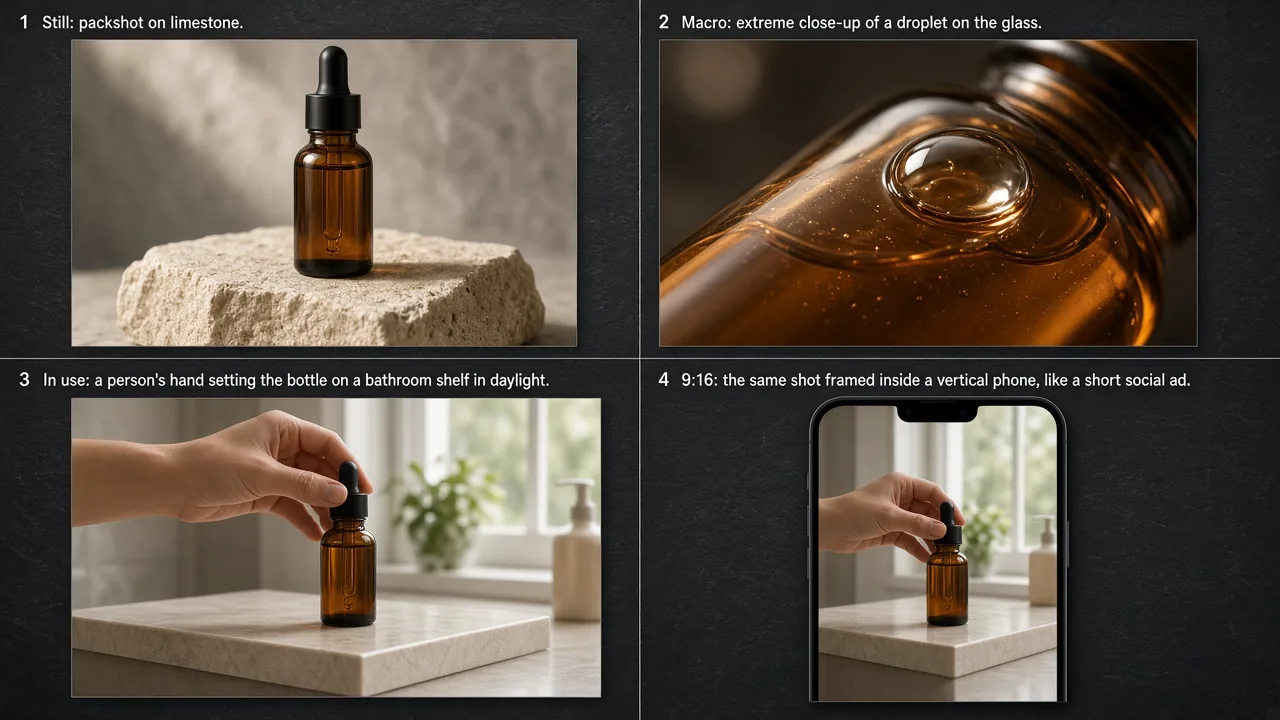
The same still can feed the other styles without a new photograph. Lifestyle in use wants the hand and the shelf. Luxury cinematic wants the light described as darker and the move kept slow. UGC wants a handheld feeling and a shorter push. Problem-then-solution needs two states, which is harder from one still: you either supply a second frame on an engine that accepts an end frame, or you accept that the "problem" half will be invented and review it harder. Unboxing needs packaging in the still. If the photograph is only the bottle, the model will invent a box, and invented packaging is a legal problem pretending to be a creative one.
Which model the picker is actually offering
The studio says nine video models sit behind one prompt, so an idea can stay put while the engine changes. These are the rows printed on the site on November 6, 2026. They are the studio's summary of each engine, and where a provider's own post is more specific, the provider wins.
| Model on the page | What the card emphasizes | Length | Picture |
|---|---|---|---|
| Seedance 2.0 | Cinematic clips, native audio, first-to-last frame | 5, 10 or 15 s | 480p to 1080p |
| Kling 3.0 | People, fast camera moves, start and end frames | 5, 10 or 15 s | 720p or 1080p |
| Veo 3.1 Quality | Higher-fidelity renders, frames to video | 8 s | 16:9 or 9:16 |
| Sora 2 | Physics-aware scenes, longer story beats, native audio in the plan copy | 10 or 15 s | 16:9 or 9:16 |
| Veo 3.1 Fast | Drafts, reference images, start-to-end frames | 8 s | 16:9 or 9:16 |
| Wan 2.7 | Landscapes and scenes, first and last frames | 5, 10 or 15 s | 720p or 1080p |
| Hailuo 2.3 Pro | Character motion from one still | 6 or 10 s | Image to video |
| Grok Imagine Video | Fast, lower-cost tests | 6, 10 or 15 s | 480p or 720p |
| Seedance 1.5 Pro | Lower-cost cinematic text and image to video | 4, 8 or 12 s | 480p to 1080p, 16:9 or 9:16 |
A selection rule follows from the table, and it is more reliable than a ranking of which model "looks best." Match the constraint you cannot relax.
- The deliverable is 9:16 and about eight seconds, and you are testing a hook: Veo 3.1 Fast, or Seedance 1.5 Pro at 8 seconds. The pricing page prices Veo 3.1 Fast at 80 credits and the cheap Seedance 1.5 Pro test at 40.
- The deliverable has to be 12 seconds or include 1080p on a Seedance engine at the low end of the price list: Seedance 1.5 Pro, up to 312 credits at 1080p for 12 seconds.
- The shot needs a pinned ending frame: Seedance 2.0, Kling 3.0, Veo 3.1 Fast or Wan 2.7, according to their cards.
- The shot is a person who has to move for several seconds and you have one portrait: Hailuo 2.3 Pro is the card written for that, at 6 or 10 seconds.
- The shot is a draft you expect to throw away: Grok Imagine Video, whose card is explicit that it is the test engine, at 480p or 720p.
- The shot needs native sound in the same render: the cards and plan copy point at Seedance 2.0 and at Sora 2. Sora 2 is priced at 150 or 250 credits. The one-time packs' own arithmetic lines up with that split: a 3,000-credit pack described as about 20 Sora 2 clips at 10 seconds is 150 credits each, and a 5,500-credit pack described as about 22 Sora 2 clips at 15 seconds is 250 credits each.
Seedance 2.5, the 30-second model from the July 31 launch post, is not one of the nine rows. If you need a 30-second single pass, this picker is the wrong shelf, and pretending a 15-second engine is "basically 2.5" will wreck the edit. Cut the story to the length the row allows, or take that job to a place that actually lists 2.5.
What the credits buy
Every account opens with 15 free credits. The cheapest video combination the pricing page names is 40 credits, so the free balance is a look at the studio, and a Seedance 1.5 Pro clip, even at 480p for 4 seconds, needs a paid balance. Veo 3.1 Fast is 80 credits. Sora 2 is 150 or 250. Those three numbers are the ones to memorize, because almost every pack on the page is explained in multiples of them.
The Seedance 3 pricing page, read the same day, lists annual plans billed once a year at a stated 50 percent discount, and one-time packs whose credits stay valid for 10 years. Annual figures printed there:
| Plan | Billed yearly | Credits | The page's own example |
|---|---|---|---|
| Starter | $118.8 a year, shown as $9.9 a month | 9,600 a year, 800 a month | About 20 Seedance 1.5 Pro clips a month at 4 s, 480p |
| Pro | $238.8 a year, shown as $19.9 a month | 24,000 a year, 2,000 a month | About 25 Veo 3.1 Fast clips a month |
| Studio | $538.8 a year, shown as $44.9 a month | 72,000 a year, 6,000 a month | About 75 Veo 3.1 Fast clips a month |
| Max | $1,078.8 a year, shown as $89.9 a month | 168,000 a year, 14,000 a month | About 175 Veo 3.1 Fast clips a month |
The examples divide cleanly. Two thousand credits a month at 80 credits a clip is 25 Veo 3.1 Fast renders. Six thousand is 75. Fourteen thousand is 175. Eight hundred credits a month at 40 credits a clip is 20 short Seedance 1.5 Pro tests. The page is showing its work. Use the same division on whatever combination you actually render, because a 1080p 12-second Seedance 1.5 Pro clip at 312 credits consumes most of a Starter month in one file.
One-time packs on the same page: Starter at $29.9 for 1,000 credits (about 25 of those 4-second 480p clips), Growth at $59.9 for 3,000 (about 20 Sora 2 clips at 10 seconds), Professional at $99.9 for 5,500 (about 22 Sora 2 clips at 15 seconds), Business at $199.9 for 12,000 (about 150 Veo 3.1 Fast clips), Agency at $499.9 for 32,000 (about 400), and Enterprise at $999.9 for 70,000 (about 875). The company section says commercial use is included on yearly plans, on monthly Studio, and on the Professional and Business packs, as set out in the terms. Read that clause against the pack you are about to buy. A pack aimed at a client deliverable and a pack aimed at a personal test are priced as different products for a reason.
Plan bullets also say paid access skips the free image queue, image downloads carry no watermark, finished clips can be downloaded, and results stay in My Creations. Stripe sends a receipt; a company invoice means emailing the order number. None of that changes the creative rule: the credit figure shown before you generate is the price of that attempt, and a retry is a new attempt.
Where the render fails, and what to change
Most wasted credits on this kind of studio come from five mismatches. Each one has a single correction.
The length is wrong for the model. A 15-second story submitted to Veo 3.1, which the card limits to 8 seconds, gets the first idea and loses the ending you cared about. Cut the story to one beat, or move to a 15-second row.
The prompt re-describes a still you already uploaded. The model treats the words as permission to redesign the product. Delete every adjective the photograph already proves, and leave the verbs.
The move is two moves. Push-in plus orbit plus a hand entering, in eight seconds, is three shots. Pick one. If the ad really needs three, render three clips and cut them together. A hard cut you control is calmer than a morph the model improvises.
The sound is requested from a silent card. You will either get silence or get sound the pricing page never described, and you cannot brief what you cannot see listed. Put dialogue and music on Seedance 2.0 or Sora 2, or add sound after export.
The brief assumes Seedance 3.0. A prompt written for a ten-minute single take, a persistent cast across a chapter, or director's notes for an IMAX frame is a brief for a model ByteDance has not released and this picker does not list. The engines above will still return a short clip. It will satisfy the first sentence and abandon the rest. Write for the row you selected.
A smaller class of failures is ordinary generative video, and retrying with a tighter brief is the remedy. Hands in an unboxing or a lifestyle frame. Type on a label. A second product appearing at the edge because the prompt said "skincare" and the model owns a whole shelf of it. A face that is close to the reference at second one and softer at second eight. Watch those on a full-screen phone before you post. My Creations is where the studio says the files wait, so a download you failed to grab is still there; the credits are what you do not get back.
Label the public post as generated. A realistic packshot can be mistaken for a photograph of a product you ship, and a realistic person can be mistaken for footage of that person. The caption is part of the deliverable. So is permission, if the face or the product is not yours.
A short path from a sentence to a file
If you want the practical sequence in one place, it is this.
Write down the one thing the clip must accomplish: a concept you do not have a picture of, or a picture that must survive. That choice is Seedance 3 text to video or Seedance 3 image to video. It is the whole strategy.
Open the generator, pick the mode, and select the model row whose length and frame match the slot where the file will be posted. Vertical social slots are 9:16. Listing and pre-roll slots on this studio's chart are 16:9.
Write the shot. One subject, one action, one camera, one light. In image to video, make the still carry identity and the sentence carry motion. If the job is a product ad, either use the e-commerce script or write an 8, 12 or 15 second table like the one above, and delete any beat the model row cannot hold.
Read the credit quote. A 40-credit test teaches more than a 312-credit guess. Render, watch the label and the hands, change one variable, render again. Download the take that survives, from the result on screen or from My Creations.
Keep the rumor in its box. Seedance 3.0, the long-form model in the February leak reports, is still a forthcoming name on the studio's own front page. Seedance 3, the generator, will make a short clip today on the engines it lists, at the credit prices it prints. Those are the files you can plan a week around. The longer ones can wait until a ByteDance launch post describes them, with a model name, a duration and a place to run them. Until that post exists, a how-to that pretends otherwise is selling a clip nobody can render.