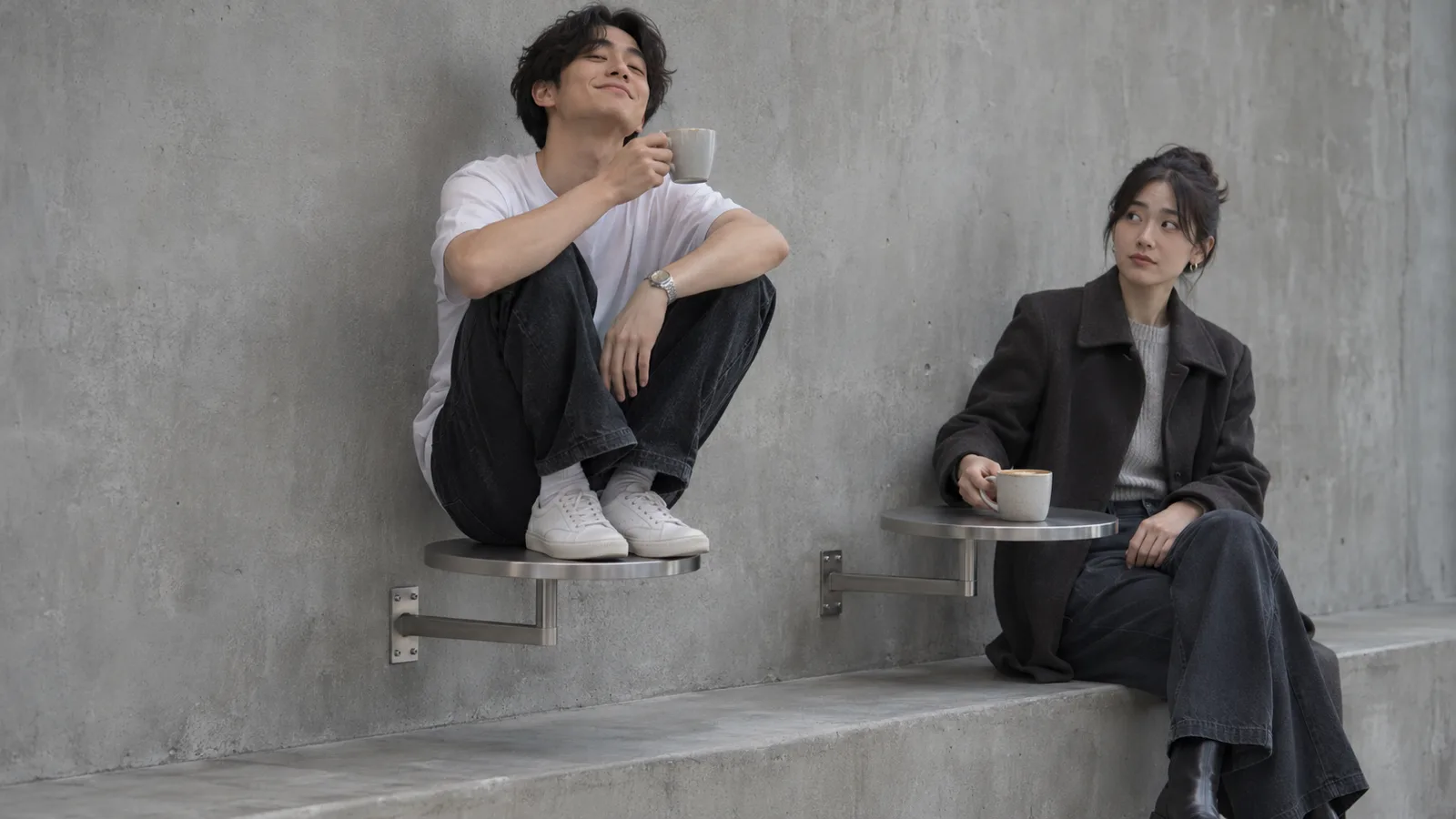
A Fancy Cafe AI video is fifteen seconds of one specific humiliation. Somebody climbs onto a tiny round cafe table, knees up, coffee in hand, entirely convinced that this is a stool. A second person walks in, sits on the bench, and sets a cup on an identical table. The first person looks at the cup, looks at the furniture under them, and then spends a long, silent second deciding how to survive the next four seconds. They climb down. Nobody says anything.
That is the whole joke, and in the first week of November 2026 it became the most copied clip on TikTok and Instagram Reels. The original, according to Know Your Meme, was posted on November 1 by TikTok user @leehoustonx, and it passed 9.2 million views in two days. Within a day of that, creators were rebuilding it with different faces, then pets, then public figures, then their own friends. You are reading this because you saw one of those rebuilds and wanted to know how it was made.
This guide answers that. It covers where the trend came from, why the furniture in it is so readable, how a one-photo generator turns a selfie into the same four beats, what it costs, and which mistakes waste a render. The worked example throughout is Fancy Cafe AI, an independent browser tool built for exactly this clip: one photo in, a roughly 15-second vertical MP4 out. It is fan-made, it is not affiliated with the meme's creators, and it is not the only site selling the same idea, which is part of the problem this article tries to solve.
What each of the five search phrases actually means
People arrive at this trend with five different phrases, and none of them are synonyms. Confusing them sends you to the wrong product page.
Fancy Cafe AI is the umbrella name. It covers the meme, the pile of generator sites that appeared within days, and every version of the clip. Used alone, it is the least precise phrase of the five, because "fancy cafe" sounds like an interior style. Search engines will happily hand you marble counters, latte art and golden hour window light. That is a different aesthetic entirely. The room in this trend is bare concrete.
First Time in a Fancy Cafe AI is the full title, which is also the caption people post. The "AI" on the end is what separates a request for the clip from a request for the meme. The original carries the caption "POV: Your first time in a fancy cafe," which is why some versions of the phrase include "POV" and some do not.
Fancy Cafe AI Video Generator is the phrase used when someone wants a file rather than a history lesson. They have seen the clip, they want their own face in it, and they want to know which site does the job and what it charges. This is the commercial query, and it is the one most saturated with near-duplicate domains.
Fancy Cafe AI Trend is the cultural object: the original clip, the first wave of remakes, the pets, the footballers, the reaction videos, and the arguments in the comments about whether any of it is real. A guide that skips the origin will send a reader to a tool that renders a completely different scene under the same three words.
Fancy Cafe TikTok Meme is how the joke is filed by people who do not know or care which AI model produced it. It is the search someone types after seeing the clip in a group chat with no context. If you are here from that phrase, the short answer is: it is a fixed-camera comedy skit, about fifteen to twenty-one seconds long, generated or heavily assisted by AI, and you can now put yourself in it with one photo.
The four beats the clip is built from
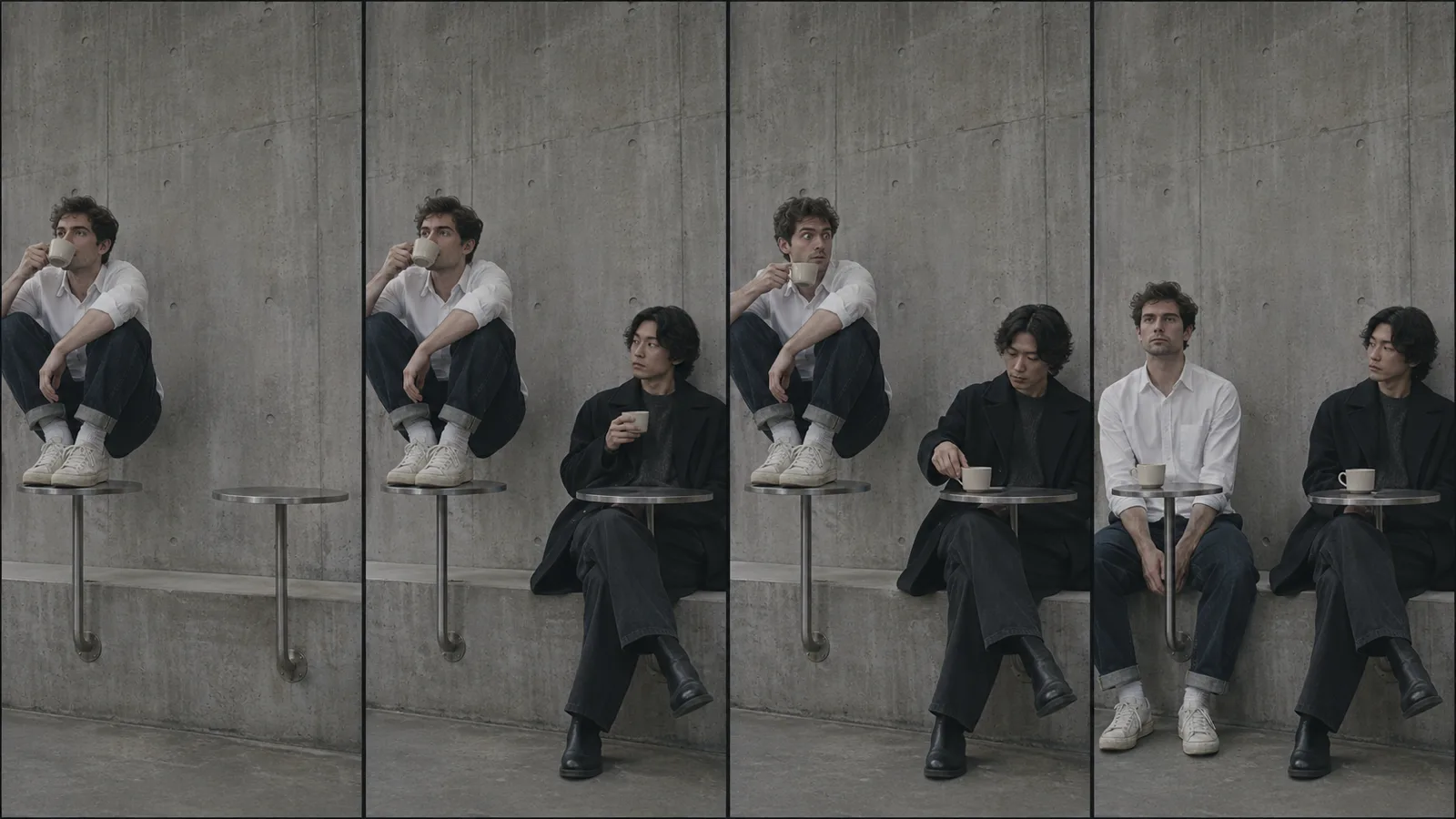
Every working version runs the same script. The timings shift a little between templates, and Fancy Cafe AI publishes its own timeline on the product page, which is a useful reference even if you never use that site:
| Time | What happens | Why it holds attention |
|---|---|---|
| 0–5.5 s | The first customer sits on the small round table, feet on the bench, sipping coffee with total confidence. | The audience spots the mistake before the character does. |
| 5.5–9 s | A second customer walks in, sits on the bench, and puts a cup on the identical table. | The furniture declares what it is, without a word of dialogue. |
| 9–11.5 s | The first customer looks at the cup, then at the table, then freezes. | This is the beat people screenshot. |
| 11.5–15 s | They climb down, sit on the bench, and stare forward as though that was always the plan. | The recovery is the punchline, not the mistake. |
Two structural decisions make that script work. First, the camera never moves. Because nothing cuts, there is no editing rhythm to get wrong, and the model only has to hold one room and one framing for fifteen seconds. Second, there is no dialogue. The joke is entirely physical, which means it survives a face change, a language change, and a badly timed caption.
Remove either of those and the format breaks. A moving camera forces cuts, and cuts need timing you have to art-direct. Spoken lines need lip sync, and lip sync is where generated video usually falls apart on a phone screen.
Why the furniture reads as a stool
The joke only lands because the mistake is genuinely reasonable, and that is a design story rather than a meme story.
Wall-mounted cafe tables are a real, popular fixture in small coffee bars. The common version is a compact round top on a single steel arm bolted straight to the wall. There are no legs, nothing touches the floor, and the whole silhouette is one vertical line and one disc. George & Willy, a New Zealand studio that makes one of the best-known versions, sells a 40 cm or 60 cm top with a reversible bracket that mounts either high, to sit above a bench, or low, with more legroom. Their own product copy is about clearing floor space in venues where every square metre of circulation counts.
Put that object about sixty centimetres above a low concrete bench and the geometry does the rest. A seat is a horizontal surface at sitting height with support underneath. So is this. The only thing distinguishing them is that one is intended for a cup and one is intended for a body, and nobody prints that on the frame. Minimalist cafes have spent a decade removing every cue that used to tell customers where to sit: no chair backs, no table edges to slide under, no menus, often no signage. The trend is not really about fancy cafes. It is about the moment a design language gets so quiet that a customer has to guess.
That is also why the clip does not work in a plush room. Marble, upholstery and a host at the door all supply the missing context. Bare concrete, one bench, one small disc on a stalk, and no staff in frame: the ambiguity is the set design.
Where the trend came from, and how fast it moved
The timeline is short enough to state precisely, with the caveat that meme provenance is always messier than the first write-up suggests.
Know Your Meme dates the TikTok to November 1, 2026, credits @leehoustonx, and reports more than 9.2 million views within two days. It describes the clip as AI-generated and files it with other AI video memes. On November 2, Instagram creator Kevin Winnik posted a version with different people that, according to the same entry, picked up more than 14.5 million likes in a day. A TikTok repost that day passed 4.2 million views. By November 3, template sites were publishing view counts for the whole cluster: one tracker counted 39 public TikTok videos in the trend with 17.9 million views across seven days, of which 22 were AI versions accounting for 6.4 million of those views. Treat all of those numbers as snapshots rather than scores. They move hourly, and different trackers count different things.
The audio is "Oh Yeah?" by Steve Lacy, and it is doing more work than most people notice. It is calm, slightly smug, and completely unbothered. The clip is a joke about being unbothered until you are not, so the song is effectively the character's inner monologue. If you swap it for something loud, the freeze stops reading as embarrassment and starts reading as panic.
What spread was not a video. It was a container. Within a day, the same four beats were being filled with cats, dogs, couples, coworkers, footballers and, inevitably, people who should not be in a family-friendly meme at all. The version with a Great Pyrenees balanced on the tiny table works because the joke transfers perfectly: nobody expects a dog to understand furniture, so the dignity of the recovery becomes the punchline. That is the sign of a format rather than a clip. The specifics are replaceable and the structure is not.
Why a one-photo generator can rebuild it
A traditional face swap keeps every pixel of the source video and pastes a new face over the head region, frame by frame. On a slow, front-facing shot it is passable. On a clip where someone turns their head, leans, and climbs down, it slips: skin tone stops matching at the neck, hair edges flicker, and the face drifts a few pixels off the skull whenever the head rotates quickly. The Fancy Cafe clip is nothing but head turns and a climb.
A generator does something different. The model receives two inputs. A reference clip supplies the motion, the camera, the room and the timing. Your photo supplies identity: face shape, hair, skin tone, and, where the tool allows a note, clothing. The model then synthesizes a new video in which a person who resembles your photo performs the reference action. Because the whole frame is generated together, the lighting on the face matches the lighting in the room, and there is no seam to find.
That is why one photo is enough. You are not being cut out and pasted in. The body, the posture and the climb are generated; the photo only has to carry enough information for the model to build a consistent face across fifteen seconds. It is also why a second photo is optional rather than required: if you do not supply the person who walks in, the tool casts a fictional adult for the role, which Fancy Cafe AI does by default.
The trade-off is the same one every video-to-video tool has. The output follows the reference rather than copying it. Timing drifts by fractions of a second. Background details are plausible rather than identical. Hands are the hardest part of any generated frame, and this clip is full of hands holding cups. If you expect a frame-accurate clone of the original, you will be disappointed. If you expect a convincing new performance in the same room, that is exactly what you get.
Fancy Cafe AI runs its Standard renders on Seedance 2.0 Fast and its Pro renders on Seedance 2.5. The practical difference on a fifteen-second clip is detail retention: sharper hands, steadier fabric, fewer soft edges when the camera is close. The Fast tier is fine for a first test, and most people should test before buying the better tier for a clip they intend to post widely.
How to make your own Fancy Cafe AI video
The workflow is deliberately short. There is no timeline, no prompt engineering, and no app to install. Everything below runs in a mobile or desktop browser.
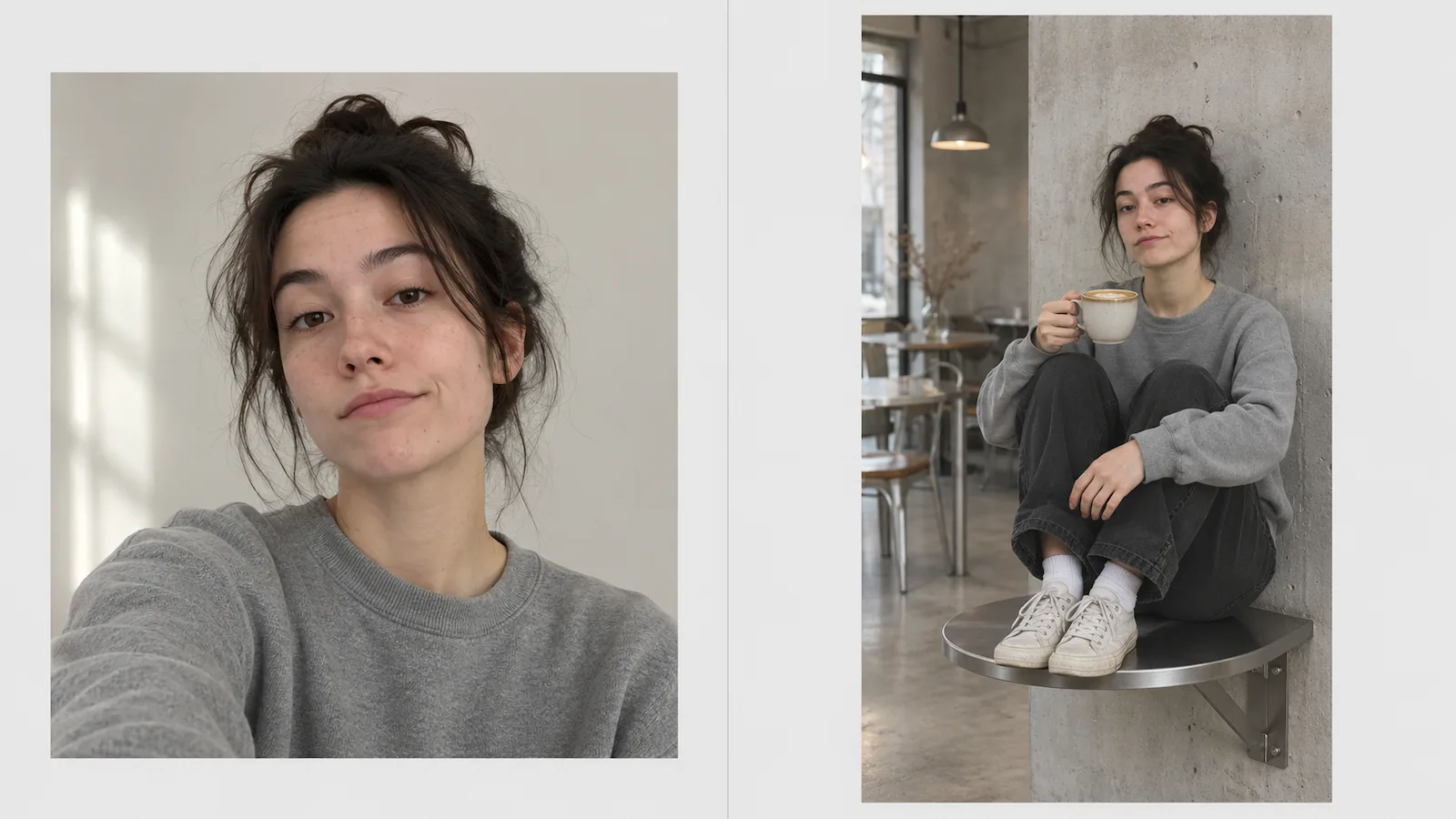
Step 1: Pick a photo the model can actually read
This is the step that decides whether the render is worth posting, and it is the step most people rush.
- One person per photo. A group shot makes the model guess whose face to build. Crop a copy around the person you want before uploading.
- Face toward the camera. Straight on or a slight angle. A strong profile gives the model almost nothing to work with.
- Even, bright light. Daylight from a window beats a dim bar. Small, dark, noisy photos produce soft faces, and a soft face in a fifteen-second clip reads as a stranger.
- Nothing covering the face. Remove sunglasses. Push back hats that shade the eyes. Skip heavy beauty filters, which flatten the exact features the model uses for likeness.
- Head, shoulders and upper body. You are choosing someone to perform a physical gag, so the model benefits from seeing how the person is built and dressed.
- JPG, PNG or WebP, under 10 MB, at least 300 × 300 pixels. Fancy Cafe AI's uploader states those limits, and it resizes before sending, so a 12-megapixel phone photo is fine.
Step 2: Decide who walks in
Photo one always plays the person on the table. Photo two plays the customer who walks in and uses the furniture correctly. You can leave photo two empty and let a fictional adult take the role, which is the fastest path and the one most people should start with.
Adding a second photo changes the joke. Two people the viewer recognises turns it from "a stranger did something odd" into "these two specific people, and one of them is about to have a bad ten seconds." That recognition is worth the extra upload, but only if both people are adults who agreed to appear. Use two separate photos rather than one group selfie; the model needs to distinguish two identities, and a single frame with two faces is the upload most likely to blend them.
Step 3: Choose model, resolution and sound
Fancy Cafe AI exposes four choices, and the trade-offs are simple:
- Standard (Seedance 2.0 Fast) versus Pro (Seedance 2.5). Standard for a test, Pro when the clip matters. The cost difference is roughly double.
- 480p versus 720p. Vertical video is watched on a phone six centimetres from a face, so the resolution difference is more visible than on a landscape clip. It also more than doubles the credit cost.
- Template sound versus Silent. The default keeps the meme's audio, timed to the action. Silent is the better choice if you plan to add the trending sound through TikTok's or Instagram's own picker, because the platform then handles licensing and ties your post to the trend page.
- Director's notes, optional. Fancy Cafe AI accepts a short note about clothing, and it must begin with the word "Outfit:". This is not a scene prompt. Any sentence about a different room, a different joke or a different timeline is outside what the template can honour.
The generator shows the credit total before you confirm. Nothing is charged until you press the button.
Step 4: Render, wait, and inspect
Rendering a fifteen-second clip takes minutes rather than seconds, and longer when the trend is peaking and the queue is deep. You can close the tab; finished clips are saved to the account's creations page, where they stay available to replay or download without spending more credits.
When it arrives, watch the whole thing before you download. Check the face in the first second, because that is the frame people decide on. Check the hands around the cup. Check the moment the second person sits, which is where models tend to lose track of who is where. If the render failed outright or a safety filter stopped it, credits return to your balance automatically, with no support ticket.
Step 5: Post it properly
Download the MP4, then let the platform do the last mile. Add the trending sound inside the app if you exported silent, keep the AI-generated label on, and caption it in the language of the trend: "POV: your first time in a fancy cafe," plus whatever the joke is for your specific cast.
What it costs, and how the credits work
Every render runs on a paid video model, so there is no unlimited free tier and no free trial credits. That is normal for this category and worth stating plainly, because a search for "Fancy Cafe AI free" returns a lot of pages that turn out to be a sign-up wall.
At the time of writing, the Fancy Cafe AI pricing page lists one-time packs and monthly plans. For a single clip, the entry point is $6.99, which covers exactly one Standard 480p render.
| Pack | Price | Credits | Roughly |
|---|---|---|---|
| Single | $6.99 one-time | 10 | One Standard 480p clip |
| Trio | $14.99 one-time | 30 | Three Standard 480p clips, or one 720p with change |
| Duo | $24.99 one-time | 55 | About five 480p clips |
| Crew | $99 one-time | 350 | About 35 480p clips |
Monthly plans start at $29.90 for 70 credits.
Credit cost per clip depends on model and resolution:
| Template | 480p | 720p |
|---|---|---|
| Standard · Seedance 2.0 Fast · ~15 s | 10 credits | 22 credits |
| Pro · Seedance 2.5 · ~15 s | 18 credits | 40 credits |
There is also a Studio pack of 900 credits, which works out to about $2.21 a clip and is the cheapest per-render route on the page. It is priced for meme pages and small teams rather than for someone trying the tool once.
Two details matter more than the headline price. Pack credits do not expire, while monthly plan credits end with their billing period, so a pack is the better buy if you post in bursts and a plan is the better buy if you post weekly. And a 720p clip costs more than twice a 480p clip on the same model, which is why the sensible order is: test at 480p Standard, then re-render the version you like at 720p Pro.
Compare prices across sites before you buy, but compare the same things. The domains competing for these searches disagree about length (fifteen seconds or twenty-one), aspect ratio (9:16 or 3:4), free previews, pet support, and whether the reference audio is included. A cheaper credit on a site that renders eleven seconds of a different framing is not a cheaper version of this product.
Casting choices that make the joke land
The format is fixed, which means the only real creative decision left is who is in it. A few casts that consistently work:
You, alone. One selfie, and let the model cast the stranger. The joke becomes "this person has never been here before," which is the most universally readable version, and the one with the lowest upload risk.
You and the friend who always picks the restaurant. Put that friend on the table and walk in as the calm regular. The comment section does the rest.
A couple on a first date. One of you makes the mistake, the other demonstrates how furniture works. Posting it is a small, shared, permanent embarrassment, which is exactly the kind of thing couples post.
A leaving-do clip for a colleague. Agree the casting with them first, and agree where it gets posted. Farewell clips travel outside the group chat faster than anyone expects.
The one friend who insists on the fancy place every year. Birthday post, caption optional, group chat obligatory.
Casting a pet is possible on some competing sites but not on every generator, so check before you upload a photo of a dog you have promised a starring role.
What does not work: casting a public figure. More on that in a moment.
Why some renders look wrong
Generated video fails in recognisable ways, and knowing them saves credits.
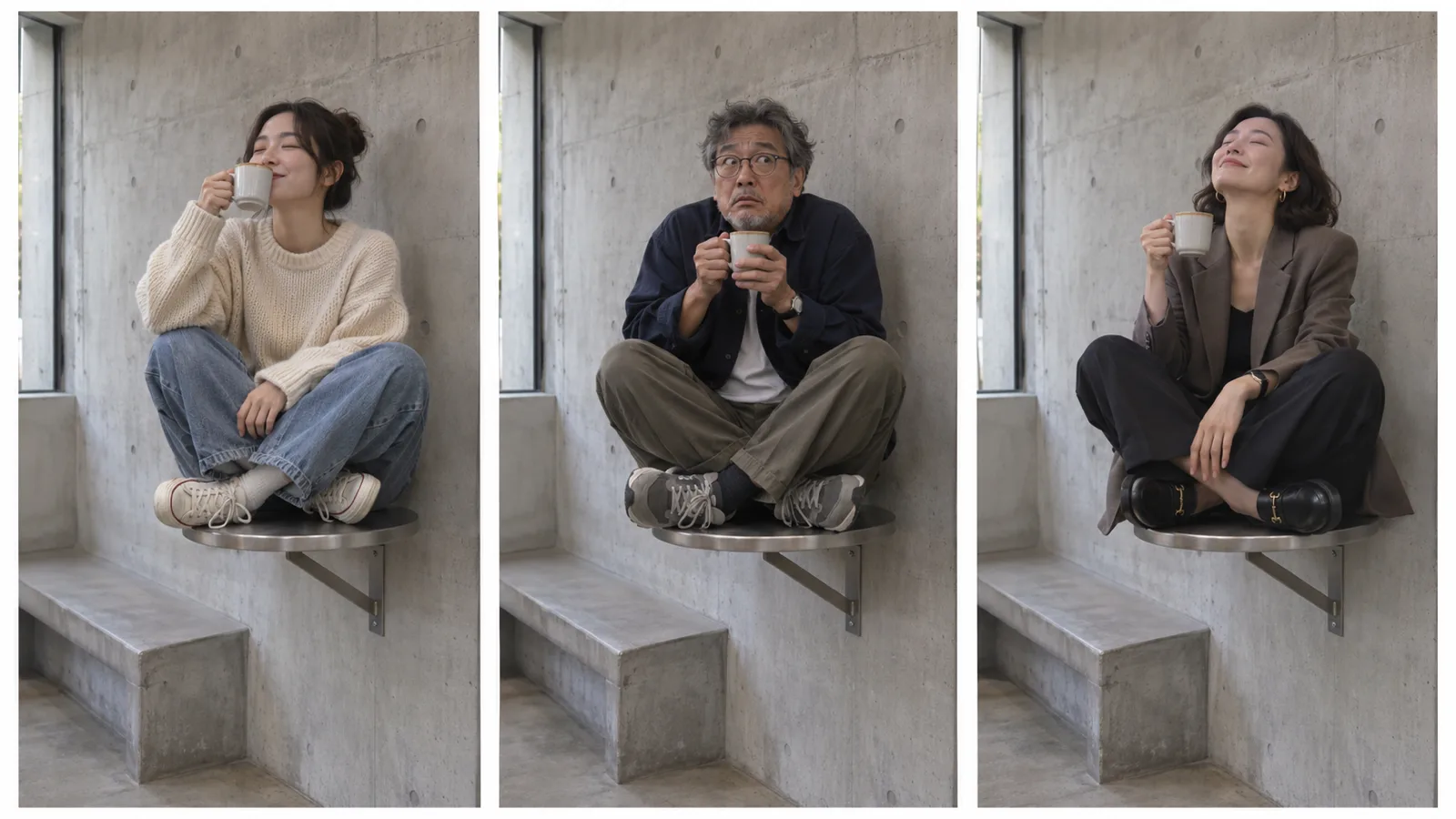
Hands around the cup. The most common artifact. Fingers blend, a thumb appears twice, or the cup floats a centimetre off the palm. A wider framing hides it better than a close crop, which is part of why the original clip keeps the camera back.
The moment of handover. When the second person enters and sits, the model has to keep two bodies coherent in one room. Watch that two-second window closely. If the bench bends or a leg passes through the table, that is a re-render rather than something you can edit around.
The climb down. The last beat requires a continuous, physically plausible movement. It is the second most common failure point after hands, and it is the beat you cannot cut, because it is the punchline.
Facial drift at the end. The further from the source photo the render gets, the more the likeness softens. If the face is strong at second one and vague at second fourteen, viewers usually forgive it, because attention is on the movement by then.
Missing or misaligned audio. If the template sound is out of step with the action, export silent and add the sound in the app. It costs nothing and removes a whole category of jank.
None of these are reasons to avoid the tool. They are reasons to watch the clip before you post it, and to keep the first render cheap.
The rules that actually matter
Adults only. Every generator in this category, including Fancy Cafe AI, prohibits photos of minors. This is not a formality. AI video of a child in a meme scene is exactly the kind of content that platforms remove and regulators investigate.
Consent for every face but your own. A friend is fine if they are an adult and said yes, and if they know where it will be posted. A coworker is fine under the same conditions. A stranger in a photo you found is not.
No public figures. The wave of celebrity and politician versions is what pushed this meme furthest, and it is also the part most likely to get removed. Realistic synthetic video of a real person saying or doing something they did not do is restricted by every major platform, and in a growing number of jurisdictions it is actionable. The tool's rules block it, and so should yours.
Label it. TikTok, Instagram and YouTube all offer an AI-generated content disclosure. Turning it on costs one tap and keeps the post in good standing. It also makes the joke land better, because viewers who know it is a recast are in on the premise rather than confused by it.
Do not claim it is real. A generated clip is a new performance made from your photos, not footage of an event. Presenting it as real is how a funny post becomes a problem.
Music rights are separate. The trend sound belongs to the people who made it. Using the platform's own sound picker keeps licensing on the platform's side; ripping the audio and uploading it yourself does not.
Fancy Cafe AI compared with the other routes
Film it yourself. Free, and the most charming version, because the embarrassment is real. It also requires a friend, a cafe willing to let you climb on the furniture, and the confidence to do it in public. Most people stop at the third requirement.
A CapCut template. Good for captions, trims and overlays. It cannot invent a second performer, so you are still pasting something into footage you did not shoot.
A face swap app. Cheap or free with a watermark, and usable on slow, front-facing shots. This clip is the worst case for a swap: constant head movement, tight framing, a physical climb.
A general video model. Tools that accept a reference video plus an image can produce a similar recast, and if you already pay for one it is worth trying. You will need a usable copy of the reference, an accurate motion description, and your own audio workflow. You will also spend your first few renders learning the interface instead of the joke.
A template site built only for this clip. You give up flexibility and pay per render, but the reference, the timing, the framing and the sound are already tuned. That is the entire value proposition, and it is why Fancy Cafe AI is the fastest route from a selfie to a postable file. It is also why the format is worth naming precisely: the site renders one specific skit, not "a cafe video."
How to post it so it travels
The clip is fifteen seconds and the first second decides everything. A few habits that make a difference:
- Start on the mistake, not the setup. Do not open with a slow pan around the cafe. The frame that stops the scroll is a person already perched on a table looking pleased with themselves.
- Caption for recognition, not for explanation. "POV: your first time in a fancy cafe" works because the viewer has seen the format. A caption that explains the joke tells people there is nothing to get.
- Use the trend sound through the app. It links your post to the sound page, which is where a lot of discovery happens for a format like this.
- Post a second version. The first one teaches you what the audience notices. Recasting with a friend, or re-rendering at 720p, is the cheapest way to double your chances.
- Reply with a video. A comment asking "how did you do this" is an invitation to post the same clip with a one-line explanation. That reply often outperforms the original.
What this trend says about AI video
For a couple of years, the promise of AI video was that you could describe anything and get it. In practice, describing anything is hard, and most people do not want to. They want to be in the clip they already laughed at.
The Fancy Cafe trend is the clearest example so far of the opposite design: a fixed room, a fixed camera, four beats, no dialogue, and a slot where a face goes. The template carries the creativity, the timing and the cultural context. The model carries the likeness. That division of labour is why someone with no editing experience can produce something people actually share, and it is why a joke about cafe furniture travelled further in five days than most brand campaigns do in a quarter.
It also raises the bar for the tools. When the scene is given, the only variables left are casting and craft, and both are visible immediately. A blurry face or a melted hand is no longer hidden by an interesting prompt. The interesting question stops being "what can this model generate" and becomes "how good is this model at keeping one person looking like themselves for fifteen seconds." That is a much harder, much more useful benchmark, and it is the one the next wave of these template tools will be judged on.
If you want to go the other way, and use your own photos and prompts rather than someone else's joke, the Happy Horse 2 studio runs several video models from one place and leaves the scene up to you. Different job, same underlying question about likeness.
Fancy Cafe AI FAQ
What is Fancy Cafe AI?
It is the name people use for the viral "POV: your first time in a fancy cafe" clip and for the tools that let you recast it with your own photos. The joke is a person mistaking a small wall-mounted cafe table for a seat. Fancy Cafe AI at fancycafe.pro is one independent generator built only for that skit.
Is the Fancy Cafe video real or AI?
Know Your Meme classifies the original clip as AI-generated, and the room has never been located. Clips made with a generator are always AI-generated, whatever the source photos. The furniture, however, is real: wall-mounted cafe tables with a single bracket are a genuine fixture in minimalist coffee bars, which is why the mistake reads as plausible.
How many photos do I need?
One. Photo one plays the person on the table, and a fictional adult plays the person who walks in unless you add a second photo. For two people, upload two separate photos rather than one group shot.
How long does a clip take to render?
Several minutes, and longer at peak times. The job keeps running if you close the tab, and the finished MP4 appears in your account's creations.
How much does one clip cost?
At 480p on the Standard model, one clip is 10 credits, and the smallest one-time pack is $6.99 for 10 credits. A 720p Standard clip is 22 credits, and a Pro clip is 18 at 480p or 40 at 720p. Failed renders are refunded automatically.
Do I need CapCut or an editing app?
No. You upload a photo, confirm the credit cost, and download a finished vertical MP4. CapCut is only useful afterwards if you want captions, a different trim, or a cover frame.
Can I post it on TikTok, Reels and Shorts?
Yes. The output is 9:16 and about fifteen seconds, which fits all three. Label it as AI-generated, use the platform's own sound picker if you replace the audio, and do not present it as real footage.
Is Fancy Cafe AI official?
No. It is an independent fan-made tool with no connection to the creators of the original clip, to TikTok or Instagram, or to the companies behind the video models it uses.
Make your own version this week
The Fancy Cafe AI trend is a rare case where the hard part has been done for you. The script, the room, the camera and the timing are fixed, and the only decision left is who is standing in the frame. Pick a bright, front-facing photo of one consenting adult, start with a Standard 480p render to see whether the likeness holds, watch the whole clip before you post it, and label it as AI. If the hands betray you, render again on the better model; if the joke lands, do the same thing with a friend.
When you are ready, start your first Fancy Cafe AI clip and find out how you look on a table that was never a chair.