Most tattoos start as a feeling rather than a picture. You know you want something for your grandmother, or a koi for the year you moved abroad, or a single word on your collarbone, but you cannot draw it and you are not sure how to describe it to an artist. That gap between "I know what it means" and "I know what it looks like" is exactly where an AI tattoo generator has become useful.
This guide looks at what a tattoo design generator actually does, where it helps and where it falls short, and how to use one without ending up with a pretty image that will not survive on skin. We use Tatany as the worked example throughout, because it is one of the few tools that connects every step of planning a tattoo: generating the idea, testing lettering, previewing placement on your own body and producing clean linework for your artist.
Why People Now Plan Tattoos with AI
Tattoos are no longer a niche decision. A 2023 Pew Research Center survey found that 32% of U.S. adults have at least one tattoo and 22% have more than one. The same survey found that about a quarter of tattooed adults regret at least one of them. That number is the real reason AI design tools took off. People are not trying to replace their artist; they are trying to lower the odds of becoming part of that 24%.
Artists have noticed the shift. In a Euronews report from September 2026, Hungarian tattoo artist Brigi Fuzes estimated that around 70% of her customers now arrive with AI-generated images. Her reaction was pragmatic rather than hostile: the images are a useful starting point, but fine detail that looks convincing on a screen does not always translate to ink, and very thin lines may not stay clear as a tattoo ages.
That tension, useful for communication but not a finished stencil, runs through every honest conversation about AI tattoos. Keep it in mind as you read the rest of this guide, because the best tools are built around it rather than pretending it does not exist.
What an AI Tattoo Generator Actually Does
At its core, an AI tattoo generator is an image model that has been steered toward tattoo artwork. You describe a subject in plain language, choose a style, and the model returns a design isolated on a clean background, usually with tattoo-style linework and shading instead of photographic texture.
That sounds simple, but a general image model and a dedicated tattoo design generator behave quite differently in practice. Ask a general-purpose model for "a koi fish tattoo" and you often get a photo of a tattooed arm, a busy background, or an illustration with soft gradients that no artist could reproduce with needles. A purpose-built tool adds the constraints a tattoo actually needs:
- Style vocabulary. Fine line, blackwork, Japanese, neo traditional, dotwork and watercolor each follow different rules for line weight, fill and color. A good generator treats style as a first-class setting rather than a word buried in your prompt.
- Placement and proportion. A forearm piece should be tall and narrow; a piece for the upper back can be wide. If the generator knows the placement before it draws, the composition fits the body instead of a blank square.
- Complexity control. The same subject can be drawn with three clean shapes or with dense detail. Being able to dial this down matters for small tattoos, where too much detail blurs over time.
- Clean output. The design should come back on a plain background with no skin, shadows or room, so it can be printed, traced or placed on a photo.
The difference between a toy and a real custom tattoo generator is mostly in how many of these constraints it builds in for you, and how easily you can carry one design through the rest of the planning process.
Tatany at a Glance: Eight Tools in One Studio
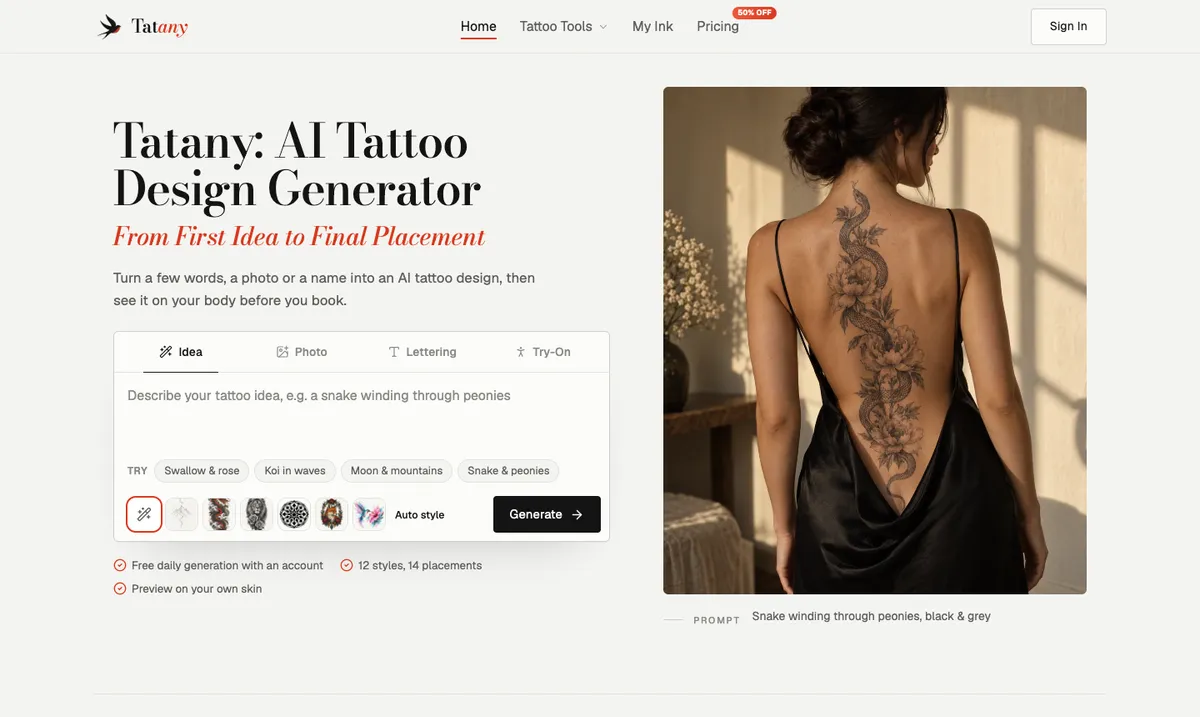
Tatany describes itself as an AI tattoo design generator that takes you "from first idea to final placement." The homepage puts a prompt box front and center with four starting modes: Idea, Photo, Lettering and Try-On. Behind that sit eight connected tools.
| Tool | What it does | When to use it |
|---|---|---|
| AI Tattoo Generator | Turns a written idea into tattoo artwork in a chosen style and placement | You have a concept but no picture |
| Image to Tattoo | Redraws a photo or sketch as tattoo linework, with a before/after slider | A pet, a place or a doodle you want to keep |
| Tattoo Font Generator | Previews text in 19 classic fonts or generates AI lettering | Names, dates and quotes |
| Tattoo Try On | Places a design on a photo of your body | Checking size and position before booking |
| Tattoo to Stencil | Extracts clean linework from a design or a healed tattoo photo | Preparing a reference for your artist |
| Tattoo Cover Up | Proposes a new design dense enough to hide old ink | Reworking a piece you regret |
| Tattoo Filler | Generates small fillers that match surrounding work | Linking a patchwork sleeve |
| AI Tattoo Idea Generator | Suggests six concepts from your interests and story | You do not know where to start |
The point of having them in one place is continuity. A design you generate is saved to a library called My Ink, and from there it can be remixed, sent to Try On, or turned into a stencil without downloading and re-uploading anything.
Step by Step: From a Sentence to a Custom Tattoo Design
Here is how a typical session in the Tatany AI tattoo generator works, along with the decisions that make the biggest difference to the result.
1. Write the idea, not the image
The prompt box asks you to describe your tattoo idea. The common mistake is to write like you are searching for stock photos: "rose tattoo, beautiful, detailed, 4k." That gives the model nothing personal to work with. Instead, describe the subject, what it means and how the elements relate to each other:
A swallow carrying a small rose in its beak, flying upward, for my grandmother who kept roses by her kitchen window. Delicate, with lots of open skin.
The meaning does not appear in the image directly, but it pushes the model toward a composition and mood that fits. If you are stuck, the Inspiration button fills the box with a sample prompt you can edit, which is a good way to see how specific a strong prompt can be.
2. Choose a style before you judge the design
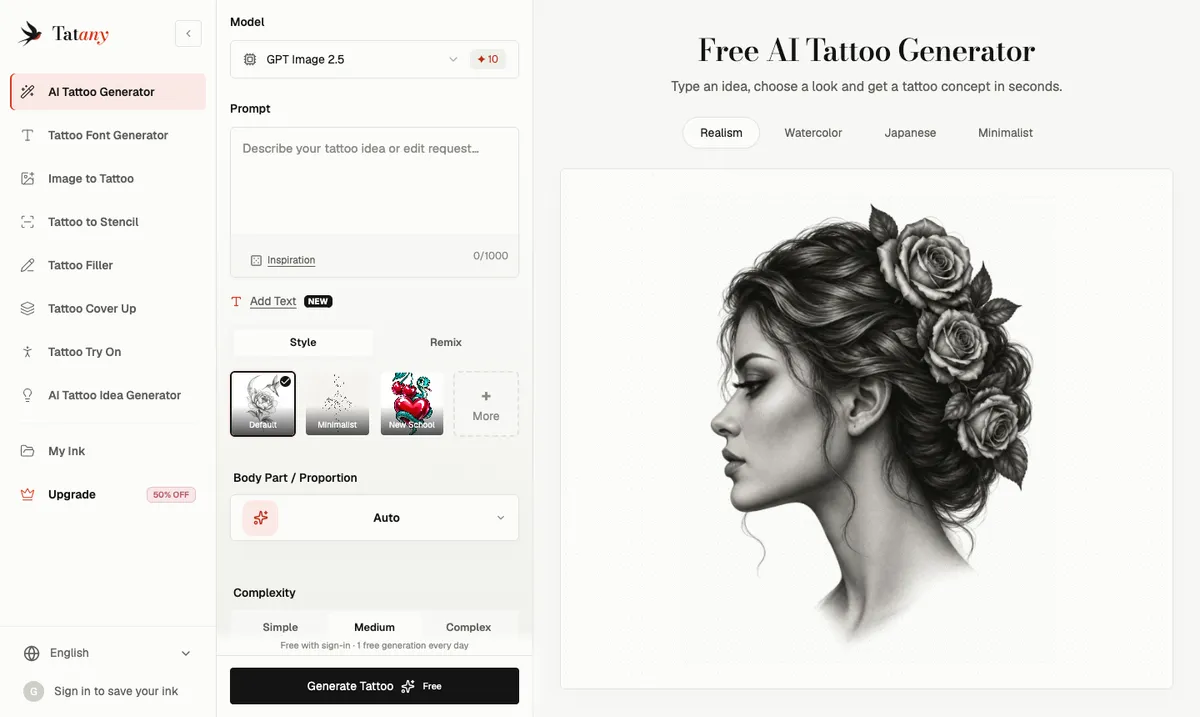
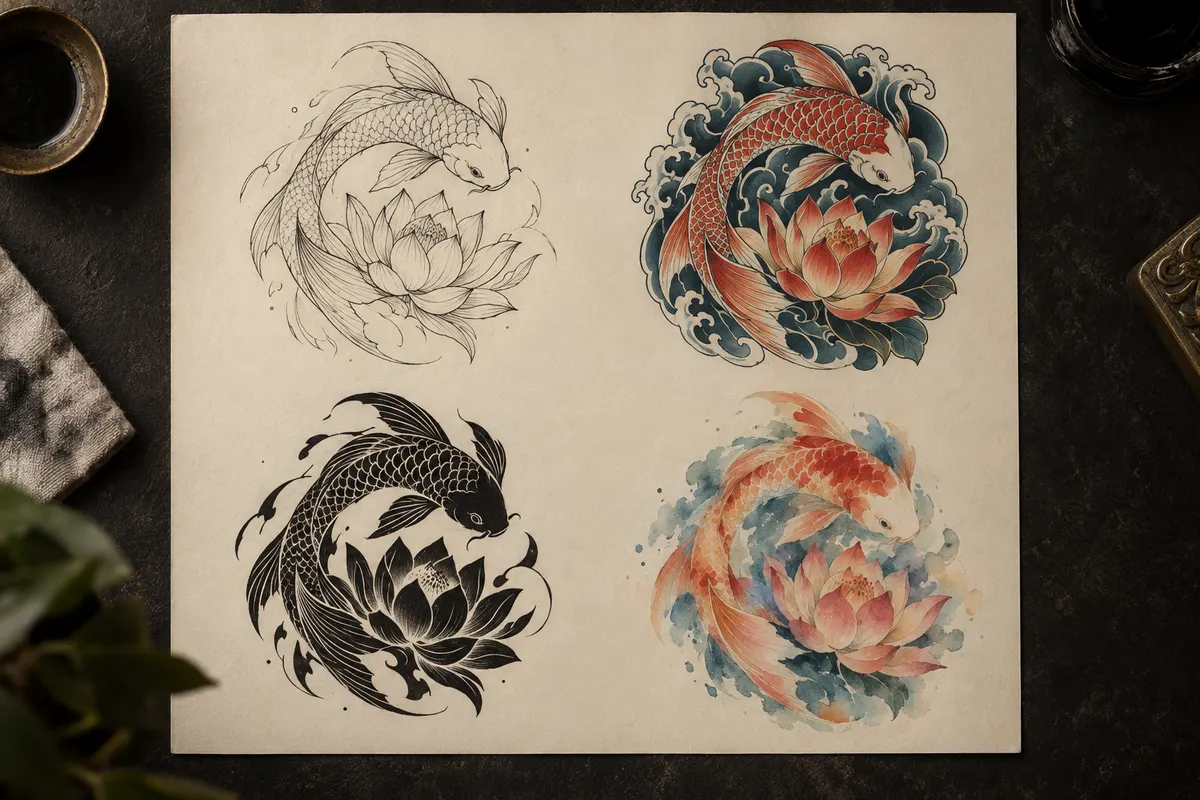
Tatany offers 12 styles: Minimalist, New School, Black & Grey, Japanese, Neo Traditional, Blackwork, Realism, Trash Polka, Tribal, Dotwork, Surrealism and Watercolor. Style changes far more than color. A Japanese piece wants waves, wind bars and bold outlines that hold for decades; a watercolor piece has almost no outline at all, which some artists will warn you fades faster.
It is worth generating the same idea in two or three styles before deciding you dislike it. Often the subject is right and the style is wrong.
3. Set placement, proportion and complexity
The Body Part / Proportion setting tells the generator where the tattoo will live, so a forearm design comes out vertical and a chest piece comes out wide. Complexity has three levels: Simple, Medium and Complex. As a rule of thumb, match complexity to size. A palm-sized piece should usually be Simple or Medium; save Complex for designs that will be large enough for the detail to breathe.
4. Generate, compare and remix
Generation takes seconds. The default model is GPT Image 2.5, and the interface shows the exact credit cost on the Generate button before you commit, which is a small but welcome bit of honesty. When a result is close but not right, Remix sends it back into the generator as a reference and clears the description, so you only write what should change: "wrap it into a band," "add a crescent moon," "move it into color." That is far more efficient than rewriting the whole prompt and hoping the model keeps what you liked.
5. Add lettering only when you will check every character
The Add Text option lets you put a name, date or short phrase inside the artwork, with eight font directions. AI image models have improved a lot at spelling, but tattoo artists still report clients arriving with misspelled AI lettering. Read every character, accent and space. For pure lettering pieces, the classic mode of the Tattoo Font Generator is often the better choice: it renders your text in 19 real typefaces on four skin tones, instantly and without spending credits, so the spelling is exactly what you typed.
See It on Your Skin Before You Book
A design that looks perfect on a white background can feel completely different on a curved forearm or a shoulder blade. This is where most AI tattoo apps stop, and where Tatany is most useful.
The virtual tattoo try-on lets you upload a photo of your arm, back, leg or shoulder, or use one of 14 sample body photos, and drop the design onto it. In Classic mode the design's background is removed in your browser, and you can drag, scale and rotate the artwork until the size feels right. Classic mode is free and does not use credits, so you can test as many positions as you like. An AI mode is also available for a generated interpretation of how the ink follows the body, at a listed credit cost.
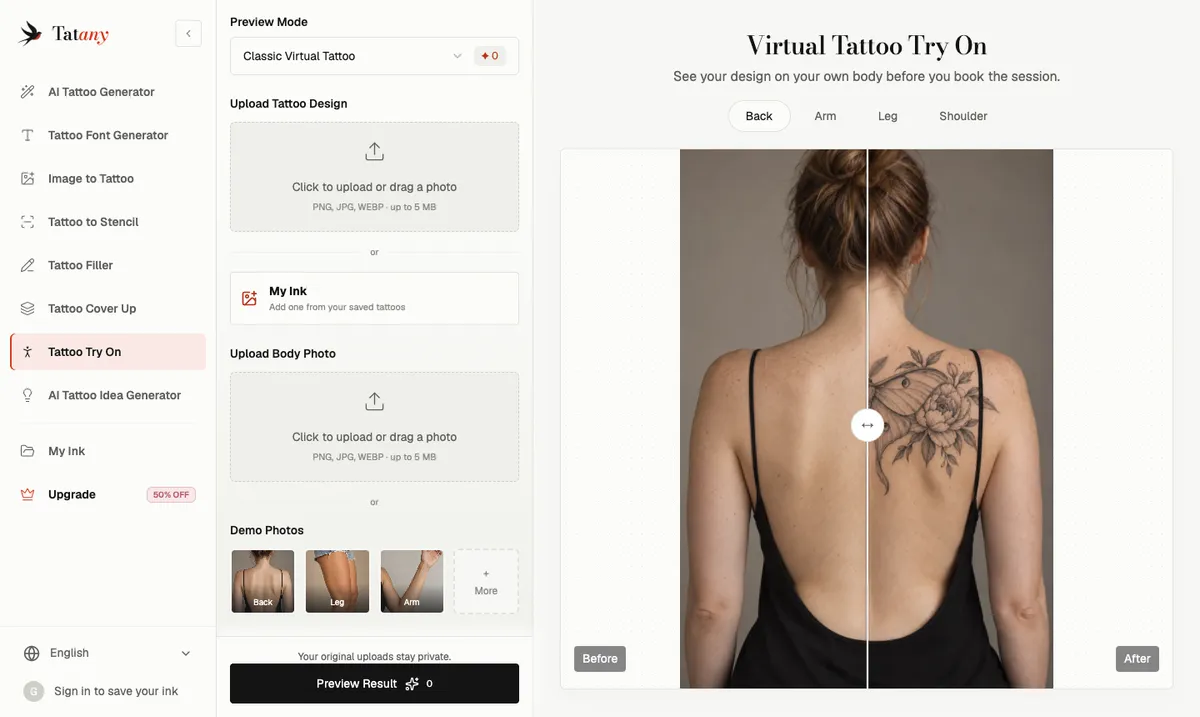
Two habits make the try-on far more valuable:
- Test one design on several placements. A fine-line moth reads very differently on the inner forearm, the ribs and the ankle. Keep the design loaded and swap the body photo.
- Test several designs on one placement. Keep the same arm photo and cycle through a compact symbol, a fuller floral and a line of script. Identical lighting and skin make it obvious which composition crowds the space.
The saved composite is the most useful thing you can bring to a consultation. Words like "small" or "along the arm" mean different things to different people; a picture of the design on your own body does not.
From Concept to Stencil: Working with Your Artist
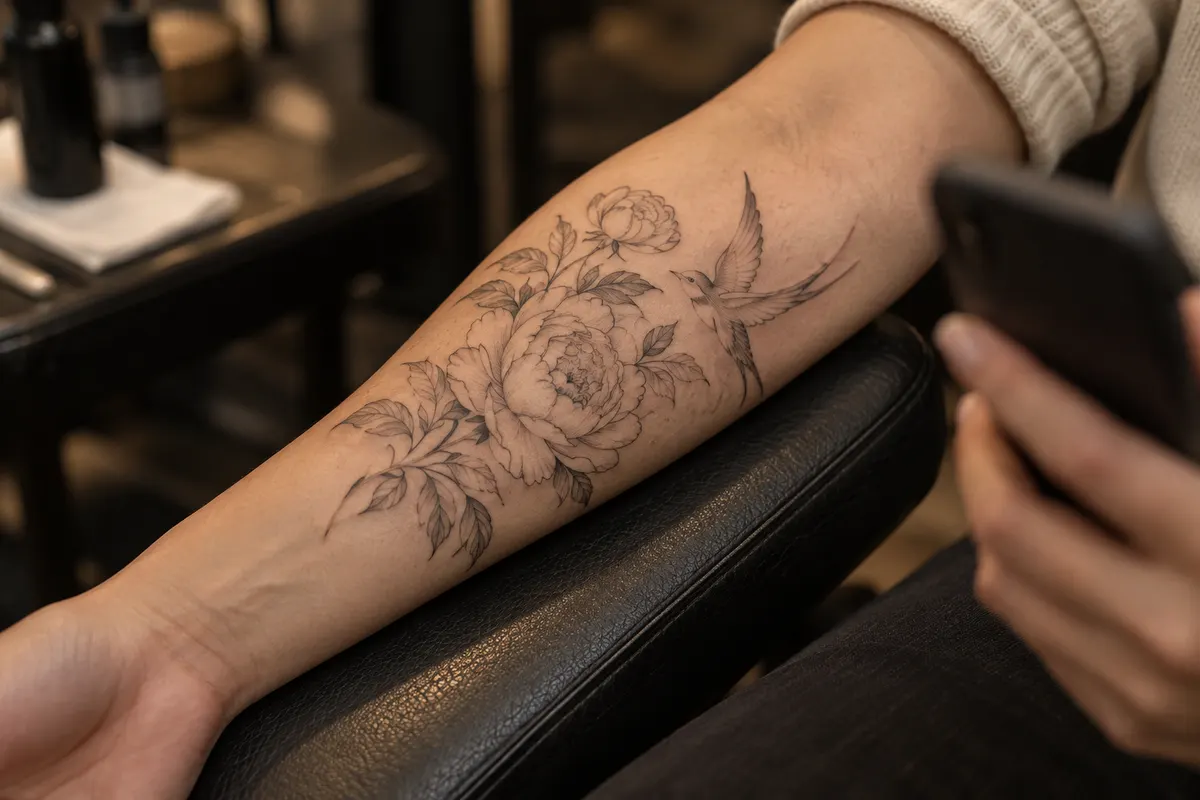
An AI tattoo design is a reference, not a stencil. Before a session, a tattoo artist scales the linework to your anatomy, adjusts line weights so they heal cleanly, prints the design onto thermal transfer paper and presses it onto prepared skin. Shading and color are added freehand afterward.
Tatany's tattoo stencil generator helps bridge that gap. You upload a design, a pencil sketch or even a photo of a healed tattoo, and it returns one of three outputs: Stencil Outline (contour lines only, the mode most people need), Original Tattoo (the artwork with shading, flattened onto white), or AI Design Upgrade (a cleaner redraw of a faded or uneven piece). Zoom into the smallest details before you download, such as lettering, fingers, petals and dotwork, because that is where linework most often merges or drops out.
When you bring AI artwork to a consultation, a few practices keep the relationship healthy:
- Bring the source file and the placement preview together. The design shows every line; the try-on shows where it sits.
- Expect changes, and welcome them. Artists will simplify detail, thicken lines or adjust spacing so the tattoo still reads in ten years. That is their expertise, not a criticism of your idea.
- Treat the design as yours to adapt, not to copy line for line. Many artists will not trace an AI image exactly, but nearly all are happy to develop a clear direction into their own drawing.
- Ask about longevity for small, detailed pieces. If the design only works at a size smaller than your palm, ask whether it should be simpler or larger.
The best outcome is the one artists describe again and again in interviews: the client arrives with a clear visual reference, and the consultation is spent refining instead of guessing.
Is There a Truly Free AI Tattoo Generator?
Searches for a free AI tattoo generator are common, and the honest answer is that most tools are "free to try" rather than free forever. The details matter, because the free tier often decides whether your designs are private and whether the files are usable.
At the time of writing, Tatany's free access works like this:
- Daily free generation. Every signed-in user gets one free standard AI generation per day, shared across all eight tools and reset at midnight UTC, while the daily free pool lasts.
- Welcome credits. A new account receives 15 welcome credits, valid for 30 days after you verify your email.
- Always-free features. Classic font previews and classic virtual try-on never use credits.
- Credit costs. Standard image operations use 10 credits and idea generation uses 2; advanced models and resolutions display their exact cost before you create.
Paid plans add what matters once you are serious about a design: private designs, 2K HD output, watermark-free downloads and a commercial-use license, with higher tiers adding print-at-scale stencil PDFs, 4K output and four variations per click. During the current promotion, annual plans on the Tatany pricing page start at $4.95 per month for Basic, with Pro at $9.90 and Studio, aimed at tattoo artists, at $19.90. Prices change, so check the page before you subscribe.
One thing to understand about any free tier is privacy. On Tatany, switching a design to private requires a subscription or purchased credits, and going private revokes any public link. If you are designing something deeply personal, such as a memorial piece with a name and dates, that is worth factoring in.
How to Compare AI Tattoo Design Generators
There is no shortage of review roundups listing "the best AI tattoo generator," and many of them are written by companies ranking their own product first. Rather than trusting a list, compare tools on the criteria that actually affect your tattoo:
- Style accuracy. Does "Japanese" produce genuine irezumi conventions, or just an Asian-themed illustration? Generate the same subject in two styles and see whether the difference is meaningful.
- Placement awareness. Can you set the body part before generating, or are you cropping a square image to fit a forearm afterward?
- Try-on on your own photo. Sample models are helpful, but your skin tone, body shape and existing tattoos are what matter.
- Stencil or linework export. Clean contour lines save your artist time and make the consultation more concrete.
- Lettering you can verify. A real font preview is safer than AI-generated text for names and dates.
- Privacy and file terms. Check whether free designs are public by default, whether downloads are watermarked, and who may use the design commercially.
- Transparent costs. The credit cost or price should be visible before you generate, not discovered afterward.
General-purpose image tools such as Midjourney or Adobe Firefly can produce striking concepts, and they are worth trying for pure inspiration. Where they fall short is everything after the first image: placement, try-on, lettering checks and stencils. That end-to-end workflow is the main argument for a dedicated custom tattoo generator.
Common Mistakes When Designing a Tattoo with AI
Even with a good tool, a few habits lead to designs that look great on screen and disappoint on skin.
Too much detail for the size. This is the most common complaint from artists. A tiny, hyper-detailed portrait looks incredible at full resolution on a phone, but the lines spread slightly as ink settles into skin, and the detail blurs over the years. Use the Simple or Medium complexity setting for small pieces, or plan the tattoo larger.
Judging a design without placement. A design that feels balanced as a square can look cramped on the wrist or lost on the back. Always run it through a try-on before deciding.
Trusting AI spelling. Check every letter, and use a real font preview for names, dates and quotes.
Stopping at the first good result. The first image is a starting point. Use remix and style changes to explore two or three directions, then compare them side by side in your library.
Asking for a famous artist's style or someone else's tattoo. Beyond the ethics, a design that copies a living artist's signature work is a poor start for something that will be on your body for life. Describe your subject and meaning instead.
Skipping the artist's input. The goal is a tattoo, not a file. The artist knows how skin, needles and healing behave, and their adjustments are what turn a concept into a tattoo that lasts.
Beyond New Tattoos: Cover-Ups, Fillers and Lettering
Two of Tatany's tools address situations a general tattoo design generator rarely handles. The Tattoo Cover Up tool lets you photograph an old or faded piece, brush over the part you want hidden, and generate a new concept dense enough to cover it, either as a full cover or as a rework that builds on your existing lines. Given that roughly one in four tattooed adults regret at least one tattoo, this is a practical way to see options before booking a cover-up consultation, which is notoriously hard to imagine in advance.
The Tattoo Filler tool is designed for patchwork collectors: it generates stars, leaves, dots and small elements that match surrounding work, so scattered pieces start to read as one sleeve. And the Image to Tattoo converter turns a photo you already love, such as a pet asleep on the couch or a child's drawing, into tattoo linework while keeping the pose and features that make it yours, with a slider to compare the original and the drawing side by side.
Frequently Asked Questions
Can a tattoo artist work from an AI tattoo design?
Yes. Most artists treat AI artwork as a reference, the same way they would treat a photo or a Pinterest board. Expect them to redraw and adapt the design for your anatomy and for how the tattoo will age.
Are AI-generated tattoo designs original?
The output is generated fresh for your prompt rather than copied from a single image, but image models are trained on large datasets, and some artists have raised concerns about that. The safest approach is to use the AI design as a direction and let your artist develop the final drawing.
Is a free AI tattoo generator good enough?
For exploring ideas, yes. Tatany's daily free generation and free classic try-on are enough to test a concept and its placement. If you want private designs, watermark-free HD files or a stencil PDF to bring to a studio, a paid plan makes sense.
How do I make sure the design will age well?
Choose a style with solid outlines for small pieces, keep complexity low relative to size, avoid very fine detail in tight spaces, and ask your artist directly. They will tell you if a design should be larger or simpler.
The Bottom Line
An AI tattoo generator will not replace a tattoo artist, and the good tools do not pretend otherwise. What it does is shrink the hardest part of getting a tattoo: turning a feeling into something you can see, test and talk about. The best results come from a simple loop of describing the meaning, comparing styles, testing placement on your own skin, and handing your artist a clear reference.
If you want to try that loop yourself, start with a free account on Tatany, write one honest sentence about what your tattoo should mean, and see where it takes you. Then take the result to a good artist and let them make it permanent.